§.主题切换
| dark | light |
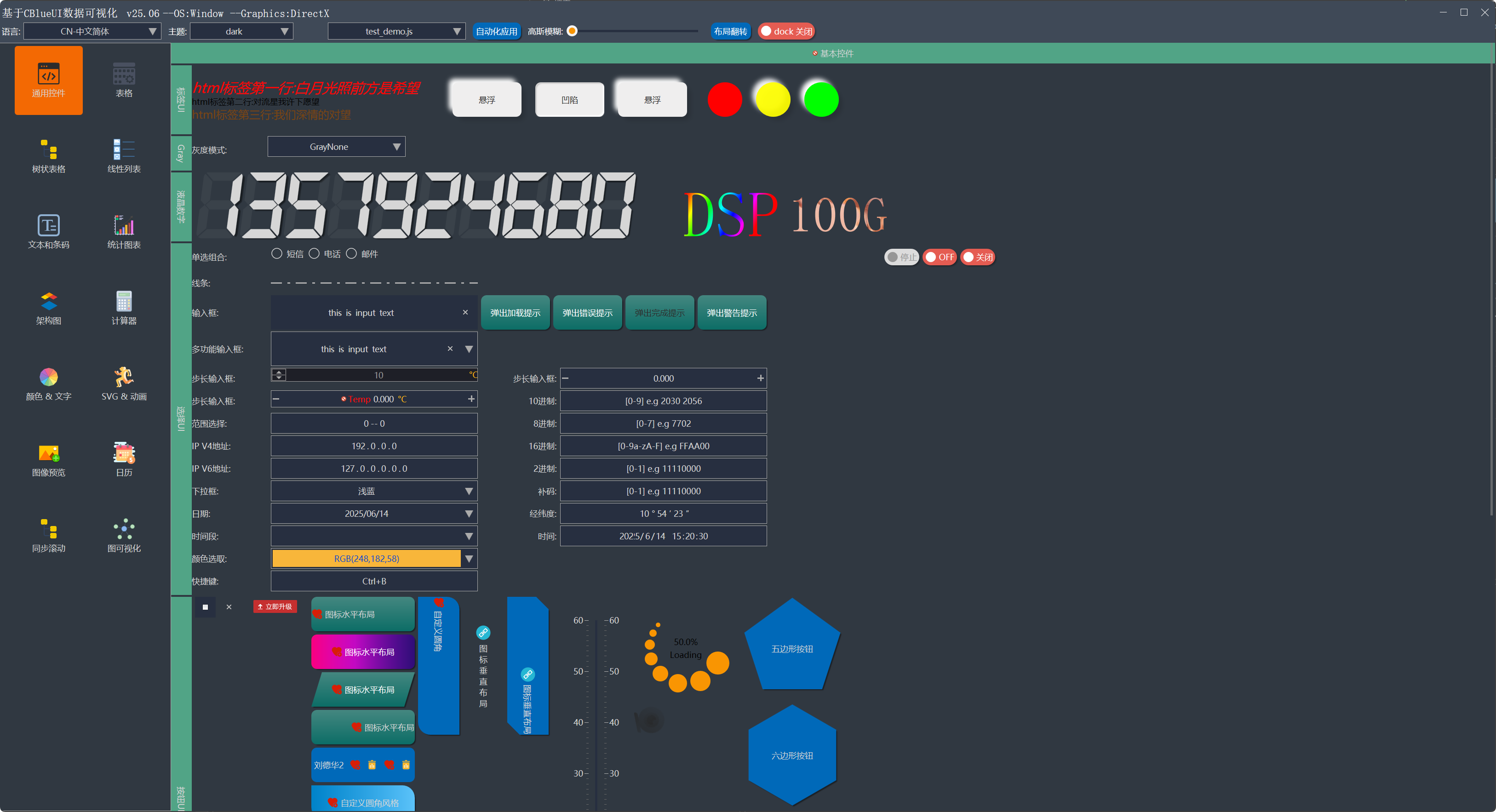 | 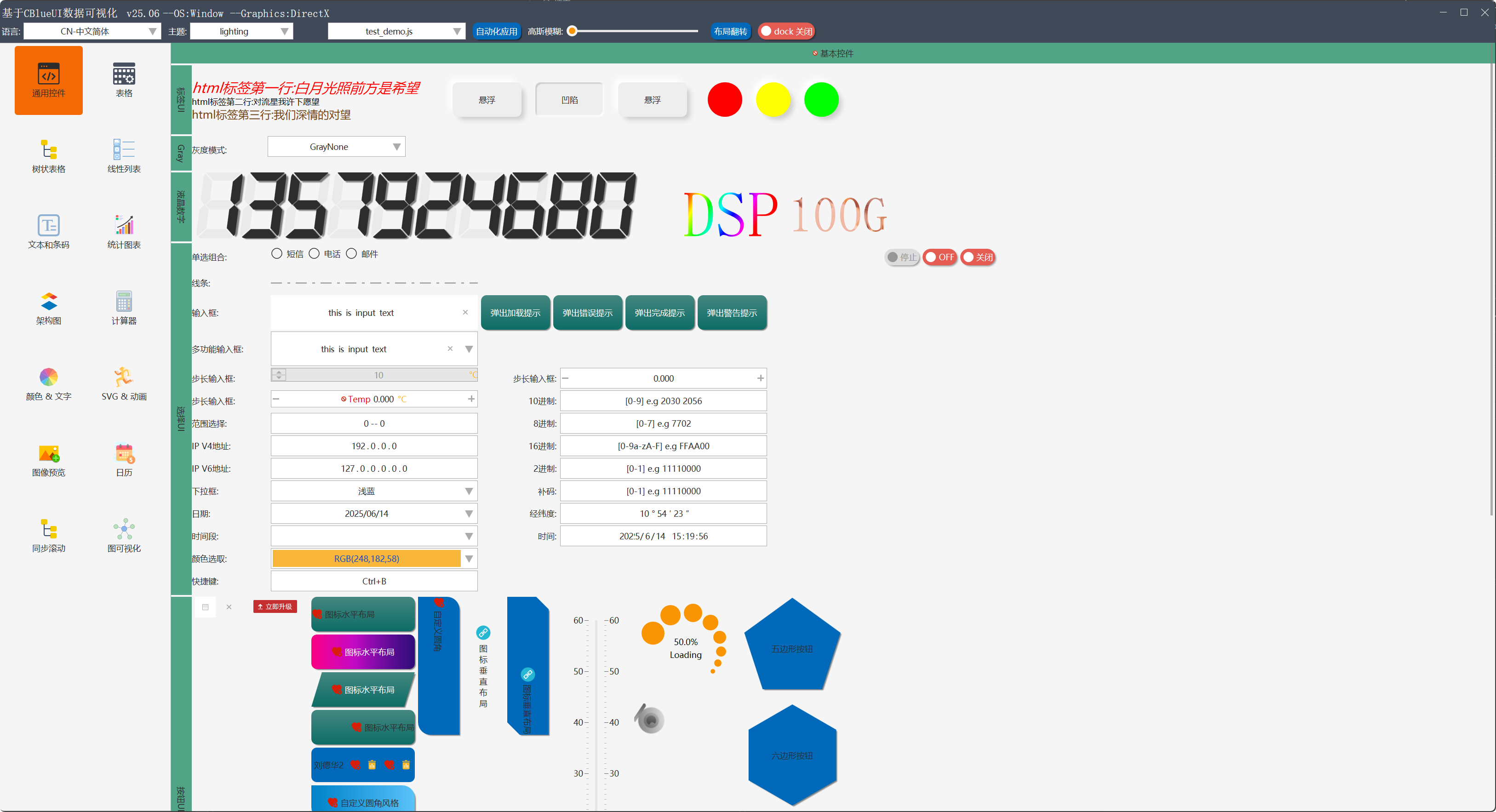 |
示例代码
ThemeCurrent()->
LoadFile(_Txt(
"../res/theme/dark.xml"));
ApplyCurrentTheme();
§. 常用控件类名-汇总
§. 常用控件
CControlUI-基类
通过此标识符,查找控件
每一种控件必然表征一种变化或者数据。当数据和变化改变时触发此事件。比如输入框内容改变,按钮按下等。 减轻开发人员记忆负担。当然对于复杂事件。用户想截获鼠标移动,按下消息。也保留了接口。 在实践应用中积累不错的口碑。
auto lamda_cancel = [this]() {
};
std::shared_ptr<IActionNotify> action = std::make_shared<FunctorAction<> >(lamda_cancel);
btnCancel->BindAction(action);
btnCancel->ClearAction();
btnCancel->TriggerAction();
void ShowControl(bool is_show, bool notify_layout = true);
void EnableControl(bool is_enable, bool is_refresh = true);
注意:控件不负责,字体的销毁释放。一般从字体管理器中获取
void SetFont(GFont* font);
多种组合可让控件更加丰富
可针对控件的各种属性,进行动画渲染(语法格式与svg animate一致)
<Control Class="CIndicatorLightUI" name="btnshadow" control-flags="DisableTheme" back-colors="normal:0x00FFFF;high:0x00FFFF" Layout="50,50" layout-align="vcenter" text-align="center|vcenter" shadow="-10,-10,15,15,2,2,rgb(255,255,255,255);10,10,15,15,3,3,rgb(0,0,0,40)" round-radius="rx:50%;ry:50%" state-current="1">
<animate
attributeName="back-opacity"
dur="1s"
calcMode="spline"
repeatCount="indefinite"
values="0.5; 0.8; 1.0; 0.7; 0.5"
keyTimes="0; 0.25; 0.5; 0.75; 1"
keySplines=".17,.67,.83,.67; .17,.67,.83,.67; .17,.67,.83,.67; .17,.67,.83,.67" />
</Control>
对于有布局属性的控件。此函数无效
BOOL MoveControl(
int x,
int y,
int w,
int h,
BOOL is_refresh =
TRUE);
void SetToolTipText(
LPCTSTR tip_text);
void SetPopTipUI(std::shared_ptr<CControlUI> popui, std::shared_ptr<PopControlInfo> popinfo);
void SetControlTextByNumber(
double value,
int precision,
BOOL remoe_last_zero);
double GetControlTextNumber() const;
void SetShadowText(
int dx,
int dy,
int blur_x,
int blur_y,
GColor color);
GShadowContain& CControlUI::GetShadowContain();
{
public:
GShadowContain();
~GShadowContain();
int AddShadow(
int dx,
int dy,
int blur_x,
int blur_y,
int spread_x,
int spread_y,
GColor color,
bool is_inset =
false,
bool use_color =
true);
void UpdateShadow(
int pos,
int dx,
int dy,
int blur_x,
int blur_y,
int spread_x,
int spread_y,
GColor color,
bool is_inset =
false,
bool use_color =
true);
void RemoveShadow(int pos);
void ClearShadow();
void CloneFrom(GShadowContain* other);
void DrawShadow(ISurface* surface, const PathTransInfo& path_info, bool is_inset);
BOOL IsShadowCount(
bool is_inset)
const;
int Count() const;
ShadowInfo* GetShadows(int len);
void ShowShadow(
BOOL show);
private:
std::vector<ShadowInfo*> m_shadowbox_list;
};
通过字符更新属性。也可以通过函数直接调用。字符串更新属性的方式,有字符匹配操作。高频操作会消耗性能
ShellAttribute("text", "new str");
SetControlText("new str");
CControlUI* FindControlByName(
LPCTSTR str_name,
BOOL is_recursion =
TRUE)
const;
int FindAllControlByName(
LPCTSTR str_name, std::vector<CControlUI*>& vec,
BOOL is_recursion =
TRUE)
const;
int FindAllControl(std::vector<CControlUI*>& vec,
BOOL is_recursion =
TRUE)
const;
CLabelUI-普通标签控件
<Control Class="CLabelUI" platform="window" Layout="adapt:5,fill" text=" --OS: Window" Font="3" control-flags="use-par-color-text" />
按钮
<Control Class="CButtonUI" TEXT="tr:自动化应用" Name="btnRunScriptTest" Layout="adapt:10,fill" text-align="center|vcenter" control-flags="use-par-color-text" />
内部封装最小化、最大化、关闭、隐藏等事件
<Control Class="CButtonSysUI" Name="closebtn" Layout="30,fill:25" sysType="close" control-flags="use-par-color-text"/>
<Control Class="CButtonImageUI" Name="imagebtn" Layout="30,30" icon="button:close"/>
<Control Class="CButtonGradientUI" TEXT="tr:图标水平布局" Name="btnStopNotify" back-gradient-normal="bru_btnblue_nor12" control-flags="DisableTheme,RoundRadiusParl" text-colors="normal:0xFFFFFF" round-radius="left-top:15,0;right-top:0,0;right-bottom:-15,0;left-bottom:0,0;" Layout="fill,50" Icon="button:add" text-align="center|vcenter"/>
<Control Class="CButtonMenuUI" TEXT="MenuButton" Name="btnOpendir" Layout="150,40" text-align="vcenter">
<PopControl pos="0,1" point-offset="0,10" align="left,top">
<Control Class="CContainMenuUI" Layout="300,adapt" padding="1,0,1,0" border-show="always" control-flags="PopupProperties">
<Control Class="CButtonMenuUI" TEXT="频率修正" Name="btnOpendir0" Layout="fill,30" text-align="vcenter" />
<Control Class="CButtonMenuUI" TEXT="去噪" Name="btnOpendir1" Layout="fill,30" text-align="vcenter" />
<Control Class="CButtonMenuUI" TEXT="混合" Name="btnOpendir2" Layout="fill,30" text-align="vcenter" />
<Control Class="CButtonMenuUI" TEXT="修音" Name="btnOpendir3" Layout="fill,30" text-align="vcenter" />
<Control Class="CButtonMenuUI" TEXT="音效增强" Name="more4" Layout="fill,30" text-align="vcenter" />
<Control Class="CButtonMenuUI" TEXT="差分修正" Name="btnOpendir5" Layout="fill,30" text-align="vcenter" />
</Control>
</PopControl>
</Control>
- CButtonPolygonUI 多边形不规则按钮
<Control Class="CButtonPolygonUI" Layout="150,150" edge-count="5" TEXT="tr:五边形按钮" cmd1="showcontrol(btnStop,false);" back-gradient-normal="bru_btnblue_nor"/>
CButtonSVGUI、CLottieUI 矢量动画控件
CLabelMultiStyleUI-HTML标签控件
<Control Class="CLabelMultiStyleUI" Name="title" Layout="adapt:30,fill" text-align="left|vcenter" back-show="never">
<html>
<p>
<i>
<font size="20" color="0x0000ff">tr:html标签第一行:白月光照前方是希望</font>
</i>
</p>
<br/>
<p>tr:html标签第二行:对流星我许下愿望</p>
<br/>
<p>
<font size="16" color="0x124578">tr:html标签第三行:我们深情的对望</font>
</p>
</html>
</Control>
CCheckBoxUI-复选框
开 或者 关
CDigitLcdUI-液晶数字
开 或者 关
<Control Class="CDigitLcdUI" text="1357924680" Layout="adapt:10,fill"/>
CComboListUI-普通下拉框
<Control Class="CComboListUI" Name="switch_lang" Layout="200,fill" border-show="always" cursel="0" HasTripe="false" input-type="ReadOnly" >
<element TEXT="tr:CN-中文简体" TextID =".././res/lang/zh.xmllang"/>
<element TEXT="tr:CNT-中文繁体" TextID =".././res/lang/cht.xmllang"/>
<element TEXT="tr:RU-俄语" TextID =".././res/lang/ru.xmllang"/>
<element TEXT="tr:EN-英语" TextID =".././res/lang/en.xmllang"/>
<element TEXT="tr:AR-阿拉伯" TextID =".././res/lang/ar.xmllang"/>
<element TEXT="tr:FR-法语" TextID =".././res/lang/fr.xmllang"/>
<element TEXT="tr:KO-朝鲜" TextID =".././res/lang/ko.xmllang"/>
<element TEXT="tr:JP-日语" TextID =".././res/lang/ja.xmllang"/>
</Control>
CComboDateUI-日期下拉框
<Control Class="CComboDateUI" Name="datecombo" value="now" border-show="always" HasTripe="false" input-type="ReadOnly" Layout="300,fill"/>
CComboDateUI-日期范围下拉框
<Control Class="CComboDateRangeUI" Name="datecombo" begin="20230201" end="now" tipstext="date tips" dropWidth="400" border-show="always" Layout="fill,20"/>
CComboColorPickerUI-颜色选择下拉框
<Control Class="CComboColorPickerUI" Name="colorcombo" value="0x3AB6F8" border-show="always" Layout="fill,20" tipstext="default tips"/>
CColorPickerUI-颜色选择面板
<Control Class='CColorPickerUI' Name='colorpicker' Layout='fill,fill'/>
CEditTextUI-输入框
void SetNumber(
double value,
BOOL no_trigger =
FALSE);
<Control Class="CEditTextUI" Name="editbase10" Layout="300,fill" border-show="always" empty-tips="[0-9] e.g 2030 2056" input-type="Scientific" />
CEditSpinBoxUI-步进数值输入框
void SetNumber(
double value,
BOOL no_trigger =
FALSE);
<Control Class="CEditSpinBoxUI" Name="stepnum3" Layout="300,fill" editbtnside="BothSide" input-range="0,100" border-show="always" Precision="3" defaultValue="0"/>
CEditTextRichUI-富文本输入框
CEditLine* GetEditLine(int pos) const;
CEditLine* InsertLine(
int pos,
LPCTSTR text,
int count = -1,
BOOL is_refresh =
TRUE);
void DeleteLine(
int pos,
int count,
BOOL is_refresh =
TRUE);
<Control Class="CEditRichUI" name="richedittest" Layout="fill,fill" control-flags="AutoScrollVerEnd12" input-type="Multiline" input-range="0,100000" border-show="true" text="sdfsdff" text-file=".././res/00_uidemo.xml"/>
CContainerUI基类-容器控件
- 封装容器UI特有属性。派生关系如下图
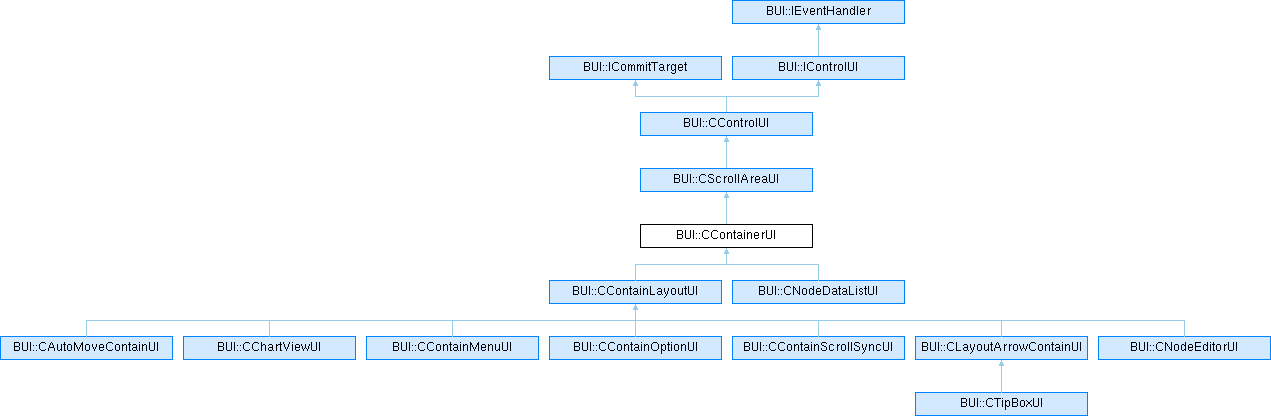
CContainLayoutUI-布局容器控件
- 和单纯的布局对象不同。容器拥有控件分组和交互能力。单纯的layout只有布局功能无UI属性
<Control Class="CContainLayoutUI" Name="connect_page" Layout="300,400" back-show="always" border-show="always" border-colors="normal:#5582F9;light:#5582F9">
</Control>
§. 图表(Plot)控件
常用函数
void AddCoordinate(std::shared_ptr<CChartCoordinate> coord);
void AddSeries(std::shared_ptr<CChartSeries> series,
BOOL isNoclip =
FALSE);
序列图表 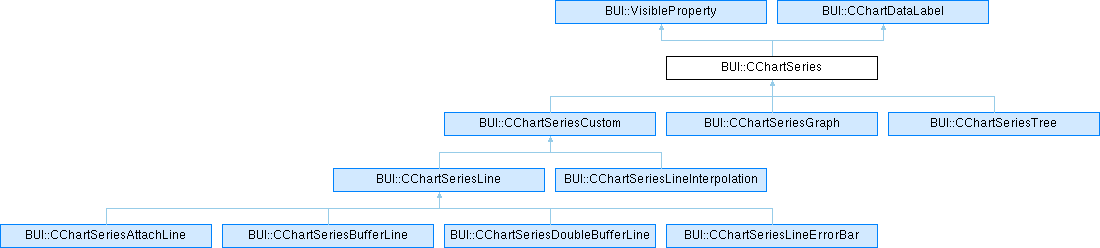
坐标系和坐标轴 
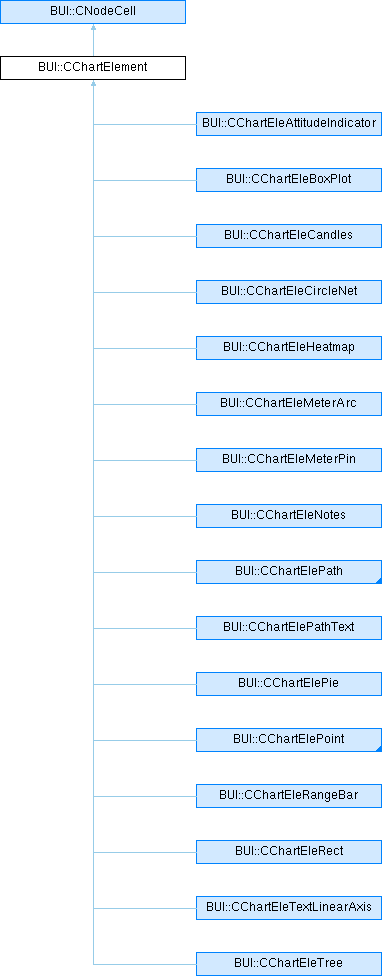
图元
- 线图表例子
<Control Class="CChartViewUI" name="chart0" Layout="300,fill" chart-padding="40,40,40,40" round-radius="rx:10;ry:10" back-show="always">
<data>
<CChartCoordinate class="LinearAxis" name="axis_x0" range="0,1" unit="0.1" minor-style="step:1" Precision="1" scope-increment="1"/>
<CChartCoordinate class="LinearAxis" name="axis_y0" Vertical="true" Precision="1" range="-2,2" unit="0.1" minor-style="step:1" show-gridbk="false" zoom="false" />
<CChartCoordinate class="CCoordinateAffine" name="axis_xy0" axisx="axis_x0" axisy="axis_y0"/>
<CChartSeries class="CChartSeriesLine" name="line" line-color="#FFA300" color="#FFA300" mark-type="cross" shadow="2,2,4,4,0,0,rgb(0,0,0,100)">
<CChartElement Class="CChartElePoint" Coord="axis_xy0" v1="0.0" v2="15"/>
<CChartElement Class="CChartElePoint" Coord="axis_xy0" v1="0.3490658503988659" v2="19"/>
<CChartElement Class="CChartElePoint" Coord="axis_xy0" v1="0.6981317007977318" v2="23"/>
<CChartElement Class="CChartElePoint" Coord="axis_xy0" v1="1.0471975511965976" v2="27"/>
<CChartElement Class="CChartElePoint" Coord="axis_xy0" v1="1.3962634015954636" v2="31"/>
<CChartElement Class="CChartElePoint" Coord="axis_xy0" v1="1.7453292519943295" v2="35"/>
<CChartElement Class="CChartElePoint" Coord="axis_xy0" v1="2.0943951023931953" v2="40"/>
<CChartElement Class="CChartElePoint" Coord="axis_xy0" v1="2.443460952792061" v2="44"/>
</CChartSeries>
</data>
</Control>
- 柱状图例子
<Control Class="CChartViewUI" name="chart0" Layout="300,fill" chart-padding="40,40,40,40" round-radius="rx:10;ry:10" back-show="always">
<data>
<CChartCoordinate class="LinearAxis" name="axis_x0" range="0,1" unit="0.1" minor-style="step:1" Precision="1" scope-increment="1"/>
<CChartCoordinate class="LinearAxis" name="axis_y0" Vertical="true" Precision="1" range="-2,2" unit="0.1" minor-style="step:1" show-gridbk="false" zoom="false" />
<CChartCoordinate class="CCoordinateAffine" name="axis_xy0" axisx="axis_x0" axisy="axis_y0"/>
<CChartSeries class="CChartSeriesLine" name="line" line-color="#FFA300" color="#FFA300" mark-type="cross" shadow="2,2,4,4,0,0,rgb(0,0,0,100)">
<CChartElement class="CChartEleRangeBar" Coord="axis_xy0" weight="0.1" x="0.1" by="-2" dy="1.5" color="0x13E4DE"/>
<CChartElement class="CChartEleRangeBar" Coord="axis_xy0" weight="0.1" x="0.2" by="-2" dy="1.1" color="0xEF7D2F"/>
<CChartElement class="CChartEleRangeBar" Coord="axis_xy0" weight="0.1" x="0.3" by="-2" dy="0.9" color="0x0068FF"/>
<CChartElement class="CChartEleRangeBar" Coord="axis_xy0" weight="0.1" x="0.4" by="-2" dy="1.0" color="0xFF00D0"/>
<CChartElement class="CChartEleRangeBar" Coord="axis_xy0" weight="0.1" x="0.5" by="-2" dy="2.7" color="0xEF7D2F"/>
<CChartElement class="CChartEleRangeBar" Coord="axis_xy0" weight="0.1" x="0.6" by="-2" dy="0.6" color="0x13E4DE"/>
</CChartSeries>
</data>
</Control>
- 散点图例子
<Control Class="CChartViewUI" name="chart0" Layout="300,fill" chart-padding="40,40,40,40" round-radius="rx:10;ry:10" back-show="always">
<data>
<CChartCoordinate class="LinearAxis" name="axis_x0" range="0,1" unit="0.1" minor-style="step:1" Precision="1" scope-increment="1"/>
<CChartCoordinate class="LinearAxis" name="axis_y0" Vertical="true" Precision="1" range="-2,2" unit="0.1" minor-style="step:1" show-gridbk="false" zoom="false" />
<CChartCoordinate class="CCoordinateAffine" name="axis_xy0" axisx="axis_x0" axisy="axis_y0"/>
<CChartSeries class="CChartSeriesContain" line-color="#2F7DEF">
<CChartElement class="CChartEleScatter" Coord="axis_xy0" v1="0.1" v2="1.3874355565226746" r="0.1" mark-type="circle" color="hsv(36.0,100,100)"/>
<CChartElement class="CChartEleScatter" Coord="axis_xy0" v1="0.2" v2="0.47014506715347415" r="0.1" mark-type="circle" color="hsv(72.0,100,100)"/>
<CChartElement class="CChartEleScatter" Coord="axis_xy0" v1="0.30000000000000004" v2="-0.36454188003719157" r="0.1" mark-type="circle" color="hsv(108.00000000000001,100,100)"/>
<CChartElement class="CChartEleScatter" Coord="axis_xy0" v1="0.4" v2="-0.3795491585854083" r="0.1" mark-type="circle" color="hsv(144.0,100,100)"/>
<CChartElement class="CChartEleScatter" Coord="axis_xy0" v1="0.5" v2="0.23226344000224497" r="0.1" mark-type="circle" color="hsv(180.0,100,100)"/>
<CChartElement class="CChartEleScatter" Coord="axis_xy0" v1="0.6" v2="-0.9954885752292142" r="0.1" mark-type="circle" color="hsv(216.0,100,100)"/>
<CChartElement class="CChartEleScatter" Coord="axis_xy0" v1="0.7" v2="1.4333993966306915" r="0.1" mark-type="circle" color="hsv(251.99999999999997,100,100)"/>
</CChartSeries>
</data>
</Control>
- K线图例子
<Control Class="CChartViewUI" name="chart0" Layout="300,fill" chart-padding="40,40,40,40" round-radius="rx:10;ry:10" back-show="always">
<data>
<CChartCoordinate class="LinearAxis" name="axis_x0" range="0,1" unit="0.1" minor-style="step:1" Precision="1" scope-increment="1"/>
<CChartCoordinate class="LinearAxis" name="axis_y0" Vertical="true" Precision="1" range="-2,2" unit="0.1" minor-style="step:1" show-gridbk="false" zoom="false" />
<CChartCoordinate class="CCoordinateAffine" name="axis_xy0" axisx="axis_x0" axisy="axis_y0"/>
<CChartSeries class="CChartSeriesContain" line-color="#2F7DEF">
<CChartElement Class="CChartEleCandles" kstyle="kline" Coord="axis_xy0" weight="0.05" x="0.1" low="0.1" high="1.6" open="0.4" close="1.0"/>
<CChartElement Class="CChartEleCandles" kstyle="kline" Coord="axis_xy0" weight="0.05" x="0.2" low="0.2" high="1.0" open="1.0" close="0.5"/>
<CChartElement Class="CChartEleCandles" kstyle="kline" Coord="axis_xy0" weight="0.05" x="0.3" low="0.3" high="1.3" open="0.35" close="1.1"/>
<CChartElement Class="CChartEleCandles" kstyle="kline" Coord="axis_xy0" weight="0.05" x="0.4" low="0.4" high="1.4" open="1.3" close="0.4"/>
<CChartElement Class="CChartEleCandles" kstyle="kline" Coord="axis_xy0" weight="0.05" x="0.5" low="0.5" high="0.9" open="0.7" close="0.8"/>
<CChartElement Class="CChartEleCandles" kstyle="kline" Coord="axis_xy0" weight="0.05" x="0.6" low="0.6" high="1.3" open="1.2" close="1.0"/>
</CChartSeries>
</data>
</Control>

 1.14.0